Best Buy Guidebook is a culmination of online publishing lessons learned. From SEO to paid ads, our team has experienced the highest of highs and the lowest of lows. Our goal now is simple: Arm readers with the most information possible.



The best scanners in 2025 are handy, hi-tech gadgets that will simplify your office operations, home-, study-, or work life. Not only are they great for going paperless, but they allow instant sharing. Now your clients don’t have to wait until you are back in the office to receive a copy of the contract they just signed. A mobile scanner can travel with you for immediate scan and send functionality and is excellent for sales reps and traveling employees. On the other hand, you might want a multi-page scanner for large volumes of paperwork. In this case, a high-tech, high-speed device with a bulkier capacity is needed. Here are our top picks to ensure you get the best scanning device that suits your work style.
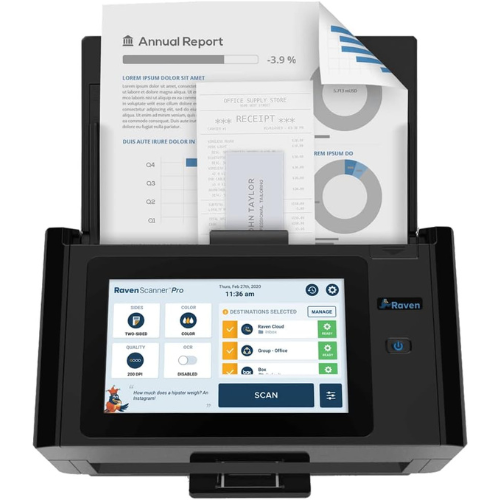
This master scanner from Raven features everything you need in a professional office space with an 8-inch LCD touch screen to control all settings. The device offers a choice of scan quality settings with a speed of up to 60 pages per minute. It also allows double-sided scanning with automatic blank page removal. The automatic document feeder holds up to 100 pages and does not require software installation. Scan directly to cloud services, email, USB drives, or network share folders. A free Raven account allows you to store documents in a personal, searchable hub with unlimited Raven Cloud storage.
| Dimensions in inches: 12.44 x 8.15 x 7.01 | Scan quality modes support 200dpi, up to 600dpi, JPEG, and PDF formats |
| 8-inch LCD touchscreen with built-in edit functionality to rotate and crop scanned pages | Whether printed or handwritten text, AI-powered optical character recognition automatically turns documents into searchable PDF files to easily locate scanned documents |
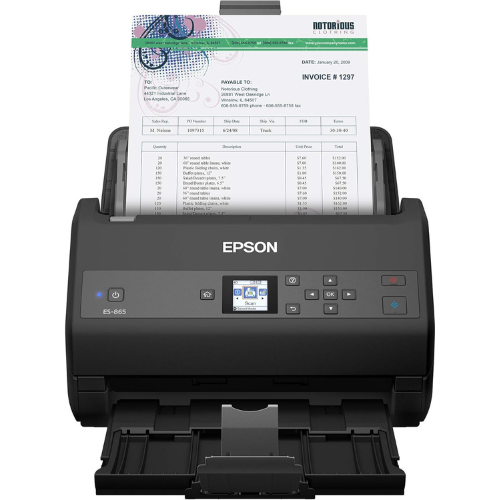
This Epson Workforce scanner is a 100-page automatic document feeder, ideal for an office scanning job. Its versatile handling allows you to scan documents of all sizes, from business cards and identity documents to A4 sheets. The device can scan up to 65 pages per minute but also features a slow-speed mode for delicate scanning. With automatic double-feed detection, double-sided scanning, and auto skew correction, you are bound to get the job done smoothly and successfully in no time. The scanner has USB connectivity and comes with ScanSmart software, allowing you to review and save documents straight to cloud storage devices like Dropbox, Evernote, and Google Drive.
| Compatible with Windows and Mac operating systems | Dual-sided scanning, double-feed detection, and skew correction |
| Resolution: 300dpi | Dimensions in inches: 8.3 x 11.6 x 8.5 |
| Built-in Nuance OCR software allows you to create searchable PDFs or editable files | Color LCD display for easy device management and control |
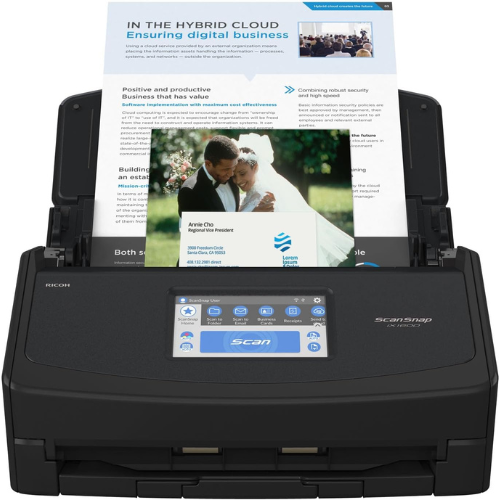
The ideal office scanner, Fujitsu ScanSnap supports up to four user licenses with profiles and icon customizations. In addition, the device offers up to 30 customizable setups enabling you to tailor the 4.3-inch touch screen functionality according to your scanning needs with color options, icons, and letters. The scanner’s WiFi compatibility ensures you can directly connect to cloud services and smart devices without logging onto your PC. The cloud-enabled document scanner also has USB connectivity and is compatible with Windows and Mac systems. Since the device triples in length when the trays are unfolded, ensure you have sufficient space to place the unit when in full use.
| Scan to any mobile device using the ScanSnap App | 4.3-inch touch screen control panel |
| Dimensions in inches: 6.3 x 11.5 x 6 | Resolution: 600dpi |
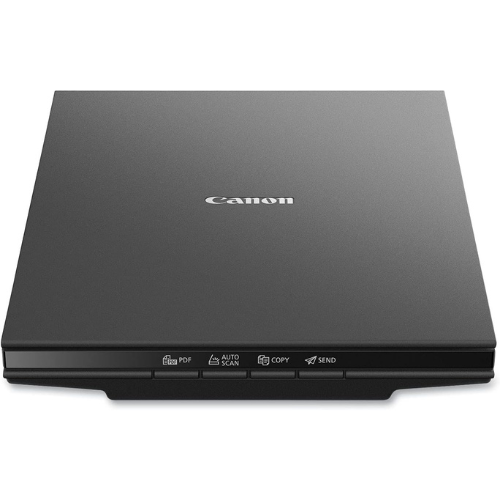
Canon’s sleek design flatbed document and photo scanner boast high-resolution image scanning capabilities in up to 10 seconds. Ideal for photo scanning, it enables image enhancements, including fade correction and dust reduction, to offer you original quality images. The device is easy to use with four buttons featuring an automatic scan mode, a built-in PDF document saver, and a scan and send option. Flatbed scanners like this are handy when scanning pages from a book or manual that cannot move through document feeders.
| Dimensions in inches: 14.5 x 9.9 x 1.7 | Resolution: 2400dpi |
| Compact flatbed design | Scan speed of approximately 10 seconds |
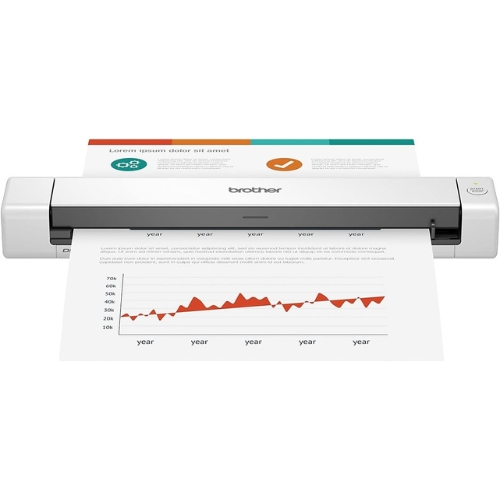
Suppose you are the type of employee or business owner that works from different locations. In that case, this handy scanner is made for you. Weighing just 1.5 pounds, the device is easy to carry around when traveling or switching office space. You can still use it even when there is no outlet by plugging it into your laptop or PC. The desktop app allows you to scan into multiple destinations, including cloud services and email since it is compatible with Mac and Windows operating systems. The page feeder automatically enhances text and detects color documents without slowing down to optimize your scans.
| This compact document feeder is easy to transport and use on-the-go | Dimensions in inches: 11.9 x 2.2 x 1.4 |
| Resolution: 300dpi | Micro USB powered with cable included |
When investing in a scanner for your office or home, specifically consider what you need it for. Scanners are often designed to scan different types of documents. So, if you are a student or researcher needing to scan pages from books or manuals, a feed-scanner will be useless to you. However, if you have 100 loose pages to scan and send your boss within an hour, a flatbed scanner that requires you to insert and scan every page manually may not be the best option. In this guide, we’ll help you choose the best scanner for fast, efficient, and stress-free office operations.
A flatbed scanner has a flat glass screen, similar to that of a photocopy machine, on which you place documents you want to scan. The scanner has a lid placed over the glass screen to protect it when not in use. Flatbed scanners are needed when scanning documents or other items that can’t move through a paper feeder. This includes pages from books or magazines and small stamps, bank cards, or laminated items. Fragile items such as old, damaged documents or photos are also best scanned on a flatbed scanner as there is no risk of damage, tearing, or getting jammed.
Sheet feeders are document-centric scanners that allow you to place multiple pages in the feeder. They will automatically be fed through the scanner, scanned, and slid out the other side. These scanners are great when you have many documents to scan and can often handle double-sided documents without having to flip pages manually. Although they are often faster than flatbeds, sheet feeders don’t always offer the same quality image resolution. You will need to be careful of the size and thickness of documents fed through the machine to avoid getting stuck or damaging the components.
These types of scanners can come with various functionalities depending on the model. They include both a flatbed scanner and a document feeder. Some models also serve as a photocopier and printer in one. These devices are bulkier and heavier than other scanners and require more desk space. However, if you need a scanner, printer, and copier, getting one machine to do everything will save you much space and time in the end. They come with all the advantages of flatbed and document feed scanners. When choosing a multi-function device, consider whether you need color printing since not all units offer the same printing capabilities.
If you know what type of documents you will be scanning, you can pinpoint the type of scanner that will best suit your needs. In addition to the type of device, here are other factors to consider.
Duplex or double-sided scanners have two scan elements, scanning both sides of a page simultaneously. Some models scan one side and mechanically turn the page to scan the other side. Some cheaper models include a manual-duplex feature that scans one side and prompts you to manually turn and refeed the page. These are the most time-consuming but are also more affordable and will suffice if you don’t scan double-sided documents regularly.
Scanner resolution ranges from 200 pixel-per-inch to over 4800 PPI. 200 to 300 PPI is sufficient for basic documents, and for photos, 600 PPI will offer excellent quality. If you plan on zooming in on features or need to scan and enlarge finely detailed items, 2400 to 4800 PPI will be more suitable.
All scanners comfortably handle A4, A5, and in-between-sized documents. Flatbeds accommodate anything smaller and are also available with larger flatbeds to accommodate bigger pages. Keep in mind that you will require more desk space for a larger flatbed surface. The size of documents that can be scanned with a feeder is more limited. Items that are too small can get damaged, while larger items just won’t fit into the feeder at all.
Another size consideration you have to make is that of the machine. Some machines fold up so that the feeders and catch trays are hidden when not used, making them relatively compact. Basic document feeders that don’t have too many extra features are available in very compact sizes that can even fit into a drawer. Flatbeds require enough space above so that you can lift the lid to position documents or books comfortably and are generally wide machines.
All modern scanners are compatible with MAC and Windows systems. Most scanners will come with some basic scanning software allowing you to edit, crop, rotate and send documents. Other features include optical character recognition and text indexing which makes PDFs searchable. Specialized scanning software is available for receipt scanners, such as accounting software to organize financial data. Most modern scanners can also scan directly to a cloud drive, shared network, or your mobile phone.
Portable scanners are super handy if you travel a lot, sign contracts on the go, or work from different offices. Some portable models don’t need to be attached to a computer, scanning directly to a cloud drive, USB, or smartphone. Other devices can be linked to a computer instead of a power outlet if you don’t have access to plug points.
If you are working with large volumes of paper, speed can make a big difference. Scanners can take anything from 10 seconds per page to 60 pages per minute.
Photo scanning requires a higher resolution than document scanning. However, most scanners provide good quality for photo scanning, so you can sufficiently use one device for both. Suppose you are using a scanner to digitize film negatives. In that case, you may opt for a photo scanner specifically, requiring high-resolution features.
300DPI is sufficient for scanning regular photos. If you are planning to enlarge the photos to 2 or 3 times their original size opt for 600 to 900 DPI.
PNG formatting offers better quality as there is no quality reduction when the image is opened and resaved. The files are usually bigger than JPEG, so emailing may not always be ideal.
Best Buy Guidebook is a culmination of online publishing lessons learned. From SEO to paid ads, our team has experienced the highest of highs and the lowest of lows. Our goal now is simple: Arm readers with the most information possible.