Best Buy Guidebook is a culmination of online publishing lessons learned. From SEO to paid ads, our team has experienced the highest of highs and the lowest of lows. Our goal now is simple: Arm readers with the most information possible.



Most people spend hours in front of the monitor, slaving away to study or earn some extra cash. Other than straining your eyes, spending too much time in front of the screen can also hurt your posture. This is why it’s important to adjust the screen according to your height and viewing angle. Monitor risers are a great way to add convenience and comfort as you use the screen. They are a space-saving and compact way to organize your surroundings. We have reviewed the most promising monitor risers of 2025 that leave you feeling comfortable and productive.
A top-quality monitor riser adds convenience to your working routine while eliminating any strain from your eyes. This is why it’s so essential to invest in a premier product.
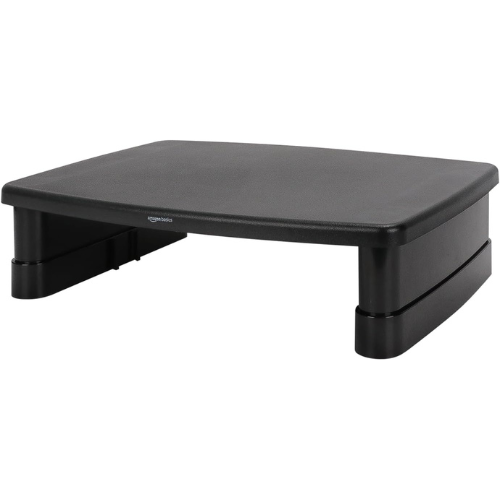
At the top of our list, we have rated the affordable and effective AmazonBasics monitor riser as our best overall choice due to its column-style rack with stackable legs. The design of this riser features an adjustable height of up to 4-⅞ inches, allowing you to maintain a comfortable posture while working. It also includes storage space that is 11-inches wide for storing keyboards, consoles, and laptops.
For even more convenience, this monitor riser has non-skid feet to help you keep the stand in one place without any slipping or shifting. It has a weight capacity of 22 pounds to store laptops, printers, and monitors.
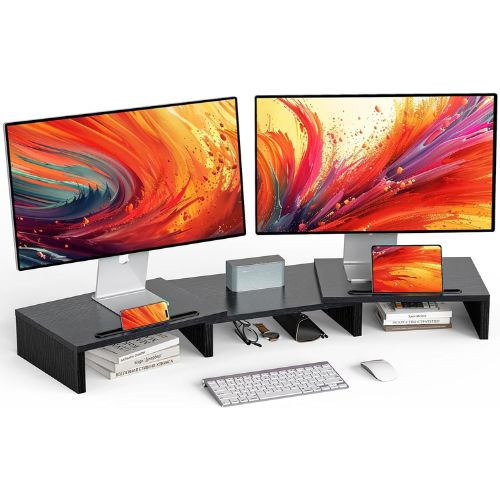
The LORYERGO monitor riser is 17.17 x 12.99 x 3.94 inches so you can store more than one gadget. It comes with added retainers at the corners so you can keep the monitor in one place without the risk of sliding. This monitor riser is made with thick MDF material that can hold up to 44 pounds of weight, making it perfect for various devices.
This riser also includes two built-in slot spaces to store things like pens, notepads, chargers, and others. Furthermore, this double monitor stand comes with four inches of ideal viewing height.
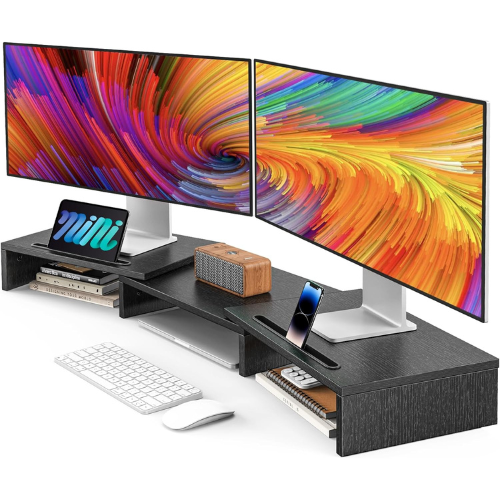
With extra-multifunctional slots, this AMERIERGO monitor riser can hold all kinds of objects, ensuring versatile use for home and office setups. It’s easy to assemble with screws, joining the base and shelves together. In addition, this monitor riser provides you with a tidy working space to be as productive as possible.
This monitor riser can raise your monitors and tablets, providing perfect viewing angles. This monitor riser does not add strain and protects you from stress due to long-time work.

This HUANUO monitor riser has an ‘H’ shape construction, so you have a sturdy monitor base with durable construction. The weight capacity of this stand is 33 pounds, allowing you to hold all kinds of devices. In addition, it raises your monitor by 4.7 inches, helping you maintain a sitting posture and an ergonomic design.
As this monitor riser comes with two drawers, you can easily store all kinds of work and study supplies. Since this monitor stand is fully assembled, this purchase eliminates any stressful setups. It’s 15.8 x 11.8 x 4.7 inches and thus is suitable for all kinds of surfaces.
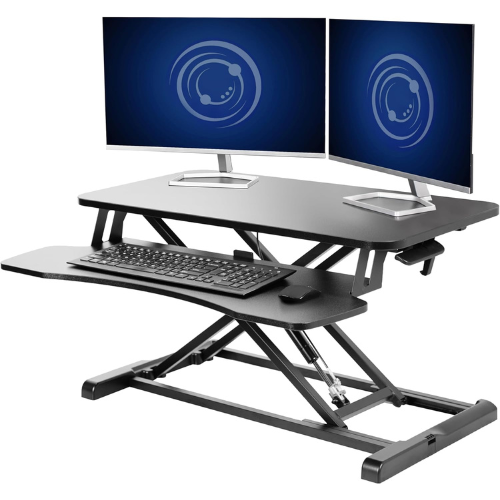
VIVO’s monitor riser desk measures 31.5 x 15.7 x 20 inches, allowing you to store many various objects in one place. A complete workstation provides on-demand standing throughout the day, ensuring freedom to relieve your muscles. It features 33 pounds of lift assistance, so you can go from sitting to standing in one smooth motion using its height locking mechanism between 4.5 to 20 inches.
This monitor riser is almost ready to go right out of the box and only requires very minimal assembly. It’s made from a sturdy, high-grade steel material, so there is no concern about breaking and damage.
To buy a top-quality monitor riser, follow our detailed buying guide below.
Here are the factors you need to consider when choosing a suitable monitor riser.
You need to make sure that your monitor is compatible with the stand you choose. Most brands come with a pre-designed model, while others can be purchased separately. In most cases, people get a customized design. Make sure that the monitor fits perfectly with your stands for a worthwhile purchase. Additionally, you also need to check the weight tolerance of your riser to ensure it won’t buckle under pressure. Other than this, the size of the riser should also be compatible with the available desk space. Most people prefer a sleek design that does not look too prominent or overwhelming.
Another essential factor to keep in mind is the material of your monitor riser. Most models are made from wood and steel. While metallic versions are more durable, they require more care and maintenance. Similarly, wood is also heavy-duty but has limitations due to temperature control.
The monitor riser must have a dedicated hold pattern to pass the cables. VESA pattern is the most popular one that matches almost all kinds of screens. Take note that the 75 x 75 mm or 100 x 100 mm VESA patterns are the most popular. Always check the model and the size of the screen before purchase.
The adjustability feature allows you to shift the angle and height of your monitor screen. This feature is essential, especially if you do a lot of art-related projects. Similarly, an adjustability factor allows you to maintain your posture and healthy neck angles while working on the monitor. Make sure that the adjustability matches your body’s needs and work-related requirements.
A common concern that most people experience when using monitor screens is multiple cables. These cables can get tangled with one another. However, you must go for a monitor riser with cable management to create a clean and tidy look.
Here is a list of monitor risers you need to know about before purchasing.
A single riser allows you to suspend one screen with an adjustable arm that holds the monitor. They are VESA compatible, making them convenient for all kinds of devices. A single monitor riser is mostly used in home-based and personal office setups as they can accommodate just one screen.
These types of monitor risers come with two or more arms. Since dual monitor risers are designed to accommodate more than one screen, you can use them in professional setups. It’s possible to adjust one screen depending on how users want it. This monitor riser features a space-saving design that ensures compatibility. Although you can use dual monitor risers for domestic use, attaching multiple screens for a promising look is essential.
These risers come with multiple adjustability features, so you get an ultra-ergonomic look. People who suffer from obesity or other spine-related health conditions can use interactive motion monitor risers to reduce physical and mental strain on their bodies.
Wall mount monitors are as they sound in that they attach to a wall instead of a table. You can use them as a space-saving medium for compact and small spaces. Although this kind of monitor riser is a great way to reduce space, it might not be an ergonomic option. There are fewer adjustability options in wall mount monitor risers compared to traditional tabletop ones.
We have compiled a list of benefits that you must use when purchasing a monitor riser.
A persistent static position throughout the day might be hazardous to your health. An adjustable monitor stand for your desk allows you to modify your body posture during the day by adjusting the screen’s height and angles. This is a great way to relax your eyes. Pair it with regular stretching, and you will have a comfortable working routine. Invest in a monitor stand to relieve back, neck, and eye strain. If you don’t have any of these problems but still utilize a daily monitor, take action for prevention measures.
Monitor risers provide you with adjustability features to match your height and sitting angles. This provides you with control over the device without doing much to the screen. This custom adjustability provides better control over posture and eyes and ensures that the monitor does not get damaged either.
Monitor risers come with management features that help you keep things organized. Most versions come with enough space to hold different things like gadgets, notepads, books, and pens. It’s smart to look for these versions if you have compact desk space and less room. Most people use monitors with dedicated space to store things in home-based offices and study setups.
A well-organized and well-lit workstation is imperative for a productive day. If your computer display takes up too much space on your desk, this can be alleviated by using a stand. The space freed up beneath the stand may finally be put to good use by giving you more room for your belongings and keeping your desk empty of clutter. This practice of organization ensures a clean environment that leads to increased productivity.
Steel and wood are the top materials used to make monitor risers. Here are the pros and cons of both.
Metal is one of the most durable and long-lasting materials of all time. It has a high-temperature tolerance that protects against unexpected heating issues. In addition, metals are easier to clean and come with anti-corrosion properties. It doesn’t retain smudges like wood, either. However, you must choose a thick metallic monitor riser with a relevant weight capacity to avoid bending. It’s much easier to adjust a metallic monitor riser. Poor-quality metal monitor risers can corrode and rust, which is why it’s essential to purchase from a reputable brand. You can choose a metal monitor riser in any design or texture.
Wood is one of the most classic materials of all time. It’s not as weather-resistant though, so you should avoid getting in contact with chemicals and water. Wood has a better weight tolerance than metal, but tends to have fewer design options to choose from. Wooden risers require a certain level of metal as well to provide an adjustable aspect.
Monitor risers are designed to improve your functionality and productivity. They are made from different materials, sizes, shapes, and weight tolerance. It’s necessary to look for a monitor riser that provides comfort and helps maintain posture. We hope that our reviews of the top-quality monitor risers help you find a perfect fit for your workspace.
Generally, a monitor riser should be about 5 to 10 cm from the top edge. Other than this, the screen's center point should be around 17 to 18 degrees below eye level. This is an ideal position, but you should pick a monitor riser that matches this screening level.
No, not all monitor risers are adjustable. Therefore, it is essential to pick something that matches your comfort level.
No, all monitor risers do not require a professional setup. However, you may need some assistance with wall-mounted versions.
Best Buy Guidebook is a culmination of online publishing lessons learned. From SEO to paid ads, our team has experienced the highest of highs and the lowest of lows. Our goal now is simple: Arm readers with the most information possible.