
What’s the Difference Between Echo Pop and Echo Dot Anyway?


When you’re on the hunt for a smart speaker but don’t want to shell out a fortune, you’ll likely end up eyeing Amazon’s Echo series. With compact, budget-friendly options like the Echo Pop and Echo Dot, these devices dominate the market. However, the arrival of the Echo Pop makes the choice less straightforward. While the Echo Dot has long been the go-to pick for many, the Echo Pop throws its hat into the ring with a fresh design and price advantage. So, the question arises: in the battle of Echo Pop vs Echo Dot, which is the better fit for your needs? Let’s break down the details—design, features, sound quality, and more—to help you decide.
Which One Looks Better on Your Shelf
At first glance, both devices share the same mission: being compact enough to fit seamlessly into your home. However, their designs cater to slightly different needs.
The Echo Pop has a semi-spherical, shallow design that’s perfect for tight spaces. Its smaller footprint makes it ideal for spots like a cluttered desk or a tiny bookshelf. Plus, it stands out with fun color options like lavender bloom and midnight teal, giving you more freedom to match your aesthetic.
On the other hand, the Echo Dot sticks to its iconic spherical design, with a fabric-covered exterior. If you’re into more premium or functional features, the Echo Dot has some variations, including an LED display model that shows the time, weather, or even song titles. It also offers a Kids Edition with playful patterns, which is great if you’re setting it up in a child’s room.
Another subtle difference lies in the placement of their light bars. On the Echo Pop, the LED light runs along the top edge—perfect if you place it high on a shelf, where the light stays visible. The Echo Dot’s light wraps around its base which creates a soft glow that reflects off the surface. It’s a small detail, sure, but one that might matter depending on where you plan to place it.
Which One Is Cheaper?
The Echo Pop is usually cheaper at around $10. The Echo Pop comes in at $49.99, while the Echo Dot is priced at $59.99. If you’re looking to save a few bucks, this might sway your decision. That said, the Echo Dot offers extra features that could justify spending a little more, depending on what you need.
The Difference in Features
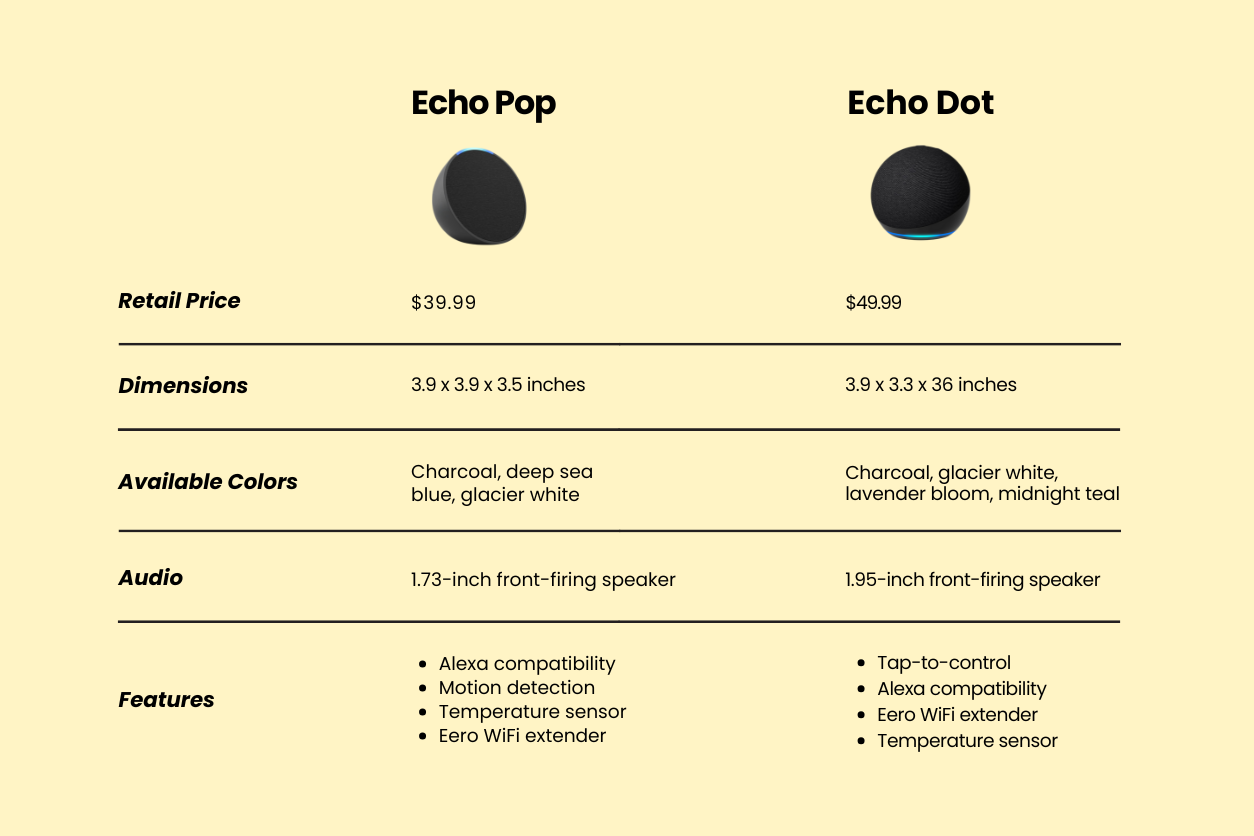
Here’s where the Echo Dot starts pulling ahead. While both devices come with Alexa, Amazon’s virtual assistant, and perform well for basic tasks like setting timers, answering questions, and playing music, the Echo Dot packs a few extras that enhance its functionality.
One standout feature of the Echo Dot is its tap-to-control function. This allows you to silence alarms or pause music with a simple tap on the top of the device—a small but incredibly convenient feature, especially in groggy mornings when you don’t want to shout at Alexa.
Another advantage of the Echo Dot is its built-in Eero capability. If you use Eero mesh Wi-Fi in your home, the Echo Dot can serve as a node, helping to extend your network coverage. This is a bonus for smart homes but might not be essential if you already have robust Wi-Fi coverage.
The Echo Dot also includes a temperature sensor, which opens up smart home automation possibilities. For instance, you could set it to turn on a fan if your room gets too warm. These features, while not deal-breakers for everyone, add layers of convenience and integration that the Echo Pop doesn’t provide.
Both devices integrate seamlessly into Alexa-powered smart homes, letting you control lights, thermostats, and other connected gadgets with your voice. However, the Echo Dot has a few tricks that give it an edge in this department.
The temperature sensor, for example, can be used to automate routines based on the climate of your room. If you have a smart fan or heater, the Echo Dot can control it for you and adjust settings automatically to keep you comfortable.
Which One Has Better Sound Quality
For many, sound quality is the deciding factor in choosing a smart speaker. Both the Echo Pop and Echo Dot deliver solid audio performance, but there are some differences to note.
The Echo Dot has a smaller driver but surprisingly outperforms the Echo Pop in terms of clarity and depth. Its sound is richer, with better bass handling and more balanced mids and highs which makes it the better choice for larger spaces or louder listening. Even at higher volumes, the Echo Dot maintains its composure and delivers clear and distortion-free audio.
The Echo Pop, while no slouch, is best suited for smaller spaces or close-range listening. Its upward-firing speaker delivers decent sound for its size, but it doesn’t quite match the depth and warmth of the Echo Dot. If you’re setting it up on your work desk or bedside table, the Pop does the job just fine. But if you’re looking to fill a larger room with sound, the Dot pulls ahead.
Which One Should You Buy?
At the end of the day, the choice between the Echo Pop and Echo Dot boils down to your priorities. If you’re looking for a budget-friendly, compact smart speaker to handle basic tasks, the Echo Pop is an excellent option. It’s stylish, functional, and affordable.
The Pop is ideal for anyone looking for an affordable, no-frills smart speaker that fits neatly into small spaces. Its playful design and price point make it an easy pick for bedrooms, desks, or even dorm rooms.
But if you’re after a bit more—better sound, added functionality, and room for smart home expansion—the Echo Dot is the way to go. The extra $10 gets you tap controls, temperature sensing, and even an LED clock if you opt for that model. It’s a small upgrade that makes a big difference in usability, especially if you’re planning to place it in a central area like the kitchen or living room.
Decades of Combined Expertise
Best Buy Guidebook is a culmination of online publishing lessons learned. From SEO to paid ads, our team has experienced the highest of highs and the lowest of lows. Our goal now is simple: Arm readers with the most information possible.